Showing posts with label 21stCentury. Show all posts

Tuesday, January 05, 2016

Flexing Time to Personalize Learning

Legacy High School was designed to be flexible with space and time. For a large majority of schools, how time is scheduled out during any day has remained unchanged despite the changes of the world around us. According to (NASSP) Breaking Ranks II, there are advantages to flexible scheduling. Learning is best when time is varied in duration, personalized and connected to the needs of the students. So when a flexible schedule is implemented with sound, innovative instructional practices, it holds a great deal of promise for students taking the ownership of learning. Time utilization is a key component for any attempt to restructure a schedule. And it is a resource that a school can control.

Schools created traditional schedules based on a uniform unit of time, generally 50 minutes in length defined a “period”. The eight period (without lunch) with each class meeting at a designated time for the same length of time every day became the most efficient way to organize the schedule of classes.

However the one-size-fits all approach does not when it comes to teaching and learning. In response to the lack of flexibility of the traditional schedule, Legacy High School implemented a Flex/Mod Schedule (KX-News).


Legacy High School’s Flex/Mod Schedule divided its school day into 22 twenty-minute instructional “mods”. These mods are combined to adjust class length, depending on the instructional need of the content. Mods can be combined to create classes that generally are between 40 to 80 minutes, however there are electives that are 120 minutes depending on the instructional nature of the course. The flexible combination of the Mods constitute a “phase”. The base “phase” configuration is 2,3,4,4 mods for a total of a possible 260 minutes.
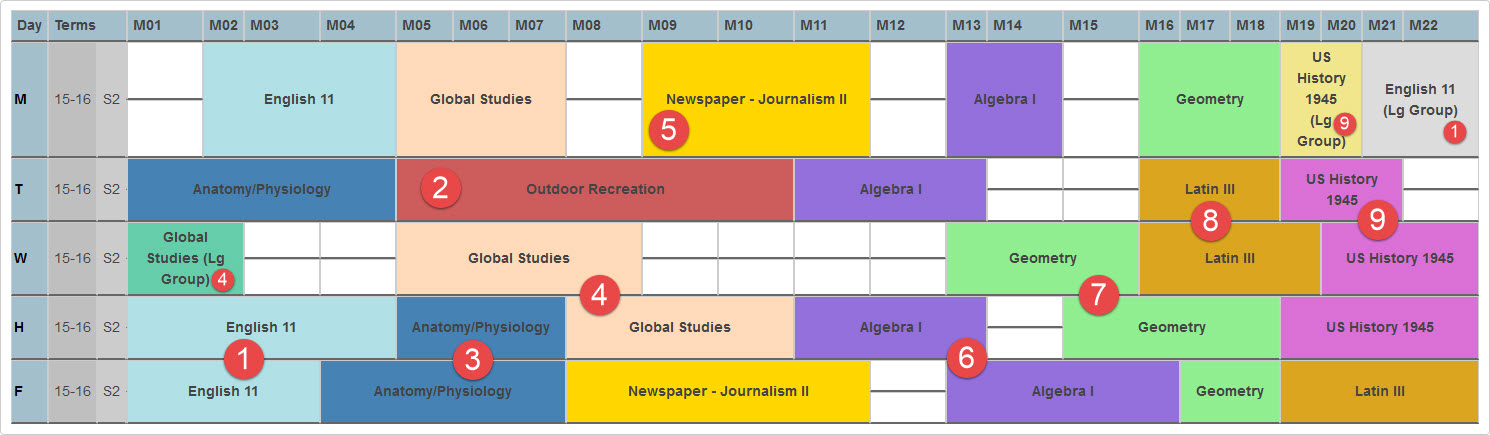
Finally those phases of 13 mods had to be flexible combined to create the master matrix for scheduling. With the final matrix consisting of 8 phases with different combinations of those 13 mods with an extra 6 mods to help with lunch.


The strength of the flex/mod schedule depends less on the term “mod” and more on the word flexible “flex”. The most important purpose of the new flex/mod schedule was to individualize and personalize learning, by varying the time. Decision about frequency and length or class meeting were made by each teacher with learning in mind. This led to the creation of a schedule that utilized the various mod combination into four categories – large group instruction, lab/discussion groups, small group (differentiated) instruction and time for individual independent study time “Saber Time”.


Large group instruction generally meet 2 mods with up to 200+ students at one time. This time is intended to be used for guest speakers, giving exams, multi-media presentations and lecture presentations by the teachers to introduce the next learning cycle. 
Meeting in large groups reduce time wasted by eliminating the need to repeat presentations and creates time for smaller student groups elsewhere in the schedule.

The second category, lab/discussion group, which are made up of far fewer students. Usually between 16-26 students similar to the typical high school classroom. 
Students in lab/discussion groups explore/expand on the lesson that was introduced in the large group.

The third category, the small group (differentiated) instruction is the backbone of flex/mod schedule. Teachers can differentiate instruction 8–16 students participate in in-depth discussion and exploration of a subject. In this setting, relationships are higher order learning is developed, and the free flow of ideas takes place.


The final category, individual independent study time “Saber Time”
is unstructured time for students. During Saber Time students participate in independent learning throughout the school. Teachers act as consultants to support students who actively take responsibility for their learning. Students freely choose how to spend their unstructured time, such as obtaining extra help, getting caught up in a class, participating in enrichment activities, or studying independently. If students choose not to use their time wisely, they will be scheduled into formal “Call Back” mods for those courses that they are failing.


The basic idea behind Flex/Mod is that the instructional program should drive the schedule, not be driven by it. If implemented well by a committed teachers working in PLCs, the advantages of flexible modular scheduling can greatly outweigh its disadvantages:
  • Students have the opportunity to take more classes, which enables them to pursue extra electives and make up credits. As a result, student deficiencies are addressed and elective areas are strengthened.
  • Students develop an increased sense of responsibility and time management, which serves them well in higher education settings and the workplace.
  • Through small group phases and the guidance program, students can develop strong relationships with peers and adults.
  • The schedule supports learning and instruction and is customized for each subject’s unique needs, which create opportunities for meaningful labs/discussions. The schedule is driven by the instructional program, not vice versa.
  • The schedule provides an enhancement of 21st Century Skills in all student opportunities for increased teacher collaboration, and promotion of research-proven best practices

Flex/Mod offers unique opportunities for team teaching, interdisciplinary classes, and ongoing professional development that draw on the strengths of the staff. On the other hand, Legacy High School must deal with the following challenges:
  • PowerScheduler software cannot schedule Flex/Mod. At Legacy High School, a school of about currently 800 students, a master timetable with almost 5,000 individual class phases must be created each school year.
  • Unstructured independent learning time leads to unique student accountability and attendance challenges.
  • There are conflicts with CTE Traditional Block Schedule with LHS Flex/Mod scheduling, so two different class phases may overlap a day or two each week.
  • Because a higher degree of responsibility and ownership for learning are placed on the student in a Flex/Mod system, extra attention and focus need to be given to those students who take advantage of the system.
  • Mods 9 to 16 are designated for lunch for students to use from their open mods, however there are some students that occasionally get only a 20 minute lunch on some days.
  • Because Flex/Mod is so different from what most adults are familiar with, there is a continual need to educate parents, new teachers, board members, and the community about the value and philosophy behind it.

Flex/Mod is not a perfect system, but Legacy High School is committed to refining the process. Because with the right settings with the right staff and combined with researched-based instructional practices, the benefits of Flex/Mod can be significant.
Flex/Mod Presentation

Monday, December 07, 2015

The Saber Cybers: A Student Driven Tech Club

The Saber Cybers: A Student Driven Tech Club


Student engagement, success skills, authentic experiences, PBL, product ownership. These buzzwords are tossed around a lot lately, but what do they actually look like? The Saber Cyber Tech Club thinks we've found some of the answers!

You might be asking just who and what is this Saber Cyber Tech Club? We're a newly formed technology oriented club at Legacy High School that partners directly with the Legacy Learning Commons (library). We have one goal - empower students with the ability to choose a direction and run with it, all while providing valuable community services back to Legacy and providing real world experiences with technology to the students as well.

What exactly are these real world experiences though?

The Saber Cyber members are responsible for keeping the 1:1 Chromebooks at Legacy in working order. They perform all hardware repairs, warranty submissions, report any misuse they see and coach fellow students and teachers on useage, maintenance, best practices, etc. The real world experience connection doesn't just come from repairing devices; however, the true connection to real world experiences happens when students become responsible for the process and procedures. Where do you put repaired Chromebooks vs. damaged ones? Parts storage? Tracking progress and billing for damage? All of these questions and more have been worked through by the Saber Cyber students, but it hasn't all been perfect! Every step of the way has been fraught with success and failure points...however those are the experiences that we all learn from and what really matters!

Chromebook management is just the tip of the Saber's nose though. The Saber Cyber members manage the 3D printing process as well. They made a pricing model for the 3D printer which bills students and teachers based on grams of materials used plus a service fee to help fund the club. They handle the request queue, manipulate the print jobs and, ultimately, print the 3D object out.

The list of projects and ways the Saber Cybers are adding value to the community while practicing success skills is very long to say the least! Need an announcement slide made and put on the TVs? How about help using a device or resource? Need help setting up technology for presentations, community events, etc? The Saber Cybers are just a form submission away!

But we're not all about hard work! Teachers are always trying to make learning fun, interesting and engaging yet valuable at the same time. We're no different! We fully embrace and encourage the club members to explore technology and to create something fun and exciting. Take a couple of the latest projects from club members, The GRB and The Piano Stairs. Both were independent projects proposed by, built by, and implemented by the Saber Cyber students.

The GRB is a custom Raspberry PI computer where they coded the OS and drivers for the touch keyboard/trackpad, LCD touchscreen and external battery. The next step in the build is to finish the 3D printed case for the device so it can be carried and used everywhere.


The piano steps was proposed based on making a banana keyboard with the makey makey kits. "Why not make the piano steps from the movie Big" a few students in the club said. Well, why not? So it happened. After a couple weeks of trial and error with different materials, devices, and methods of playing the music they came up with a solution that worked. One evening a couple students ran wires, programmed makey makeys and arduinos, hooked up speakers and eventually walked away smiling. Not because it worked right away, but because of the journey, successes and failures, and ultimately the product they produced was something they could be proud of. The next day the Legacy populous couldn't quit talking about and using the steps!

The best part about all of this? It happened in one semester! The next best part? The second semester is shaping up to be better than the first! Five of our members are traveling to the TIES conference in Minneapolis to present on their unique experiences in the club. The club has recently been in contact with other districts like Grand Forks to give a collaborative presentation at the upcoming spring NDATL. We were also contacted by the girls basketball and volleyball booster clubs for Legacy. We signed a contract with to manage their website content, player introduction presentation and pump-up video. All of the incoming funds go directly to the club so we can buy more technology items, go on field trips, pay for guest speakers, etc. Our Legacy Saber Cyber podcast will also be going live in the second semester and will be used as a way to broadcast messages from the community, teachers, students, other clubs, etc. The students are also hoping to get an official website going where we can post news, events, projects, etc.

Check out the Saber Cyber blog on lhstoday.com -->Saber Cyber tab
Contact the Saber Cybers using our form: https://goo.gl/WAMkHk

Wednesday, September 02, 2015

Ingredients for Inspired Productivity


Image result for focused
So hey, I’ve been meaning to ask,
“How productive are you and your team?”  


Say What?


There is no doubt staff and teams are meeting, discussing and working to solve problems.  I am not asking because I think we should work harder, I am asking so that we can think together about how we can be more collaborative, creative, and focused in our work. 

This year you will hear more about the Success Skills 4 Staff (this is a small set being used by district leaders to reflect on their team functioning).  These types of skills have been part of report after report on the functioning skills that make people successful.  So, while obviously you need to know the critical content of your job, you won’t be shocked to learn that your content knowledge doesn’t go far without competencies in listening, initiative, flexibility, reasoning, idea generation, and self-regulation.  While some of the success skills have endured over time the tools and strategies for excelling might be what has changed most.  Technology tools, particularly collaborative tools that allow for synchronous and asynchronous idea generation, feedback, and revisions, are offering paths for higher levels of contribution and productivity.

We are fortunate in our district to have access to a variety of technology tools for professional productivity.  Teams I am on use wikis within Moodle for highly searchable agenda and notes.  We use Google Docs, Spreadsheets, and Presentations almost exclusively to brainstorm, create, provide feedback, refine, and publish. Getting all team members in and contributing to the thinking and product from the beginning often results and a solid draft in one meeting - how awesome is that!  From a professional use aspect the Google “more” options also include concept mapping tools and a great collaborative Gantt chart application for project management.  Finally, a tool we should all explore is the Skype Meeting option in Outlook. What a great option for multi-building meetings to save driving/productivity time.


Want to chat about technology tools for increasing personal and team productivity?  

Join us with your ideas at the September 8th Twitter Tuesday.  Tweet with us from 8:30-9:00.

Questions we will explore include:  
  • What is one of the most inspiringly productive teams you have been on?  
  • What work habits make a team highly productive and invigorating?
  • What technology tools do you use to keep track of and insure completion of your tasks?
  • What technology tools do the teams you are part of use to generate ideas?  
  • What technology tools do the teams you are part of use to co-create products?  
  • What technology tools do the teams you are part of use to communicate?

Monday, October 27, 2014

Creating a 4Cs Culture

We know we are living in a world where routine and repetitive tasks are becoming more automated. Because of this, we must develop the capacity in our students to innovate and work together in an effort to prepare them for jobs, problems, environments, and lifestyles that do not yet exist. How do we do this? We need to encourage students to try something new. We need to create environments where students are free to have ideas, to act on those ideas, and to feel comfortable with those ideas being either fantastically successful or fantastically unsuccessful.

We also know that we cannot create these environments for students before creating them for teachers and staff. Showing them that the first attempt should necessarily be the final attempt. Modeling risk taking, creativity, and collaboration in our schools and classrooms is the important first step to encouraging our students to do the same.

So, how do we know when we have done it well? How do we help students “see” a goal of being creative? How do we encourage them to dig deeper and demand the cycle of feedback and revision? Below is a graphic depicting some of the behaviors of Creativity, Collaboration, Communication, and Critical Thinking. These help us to identify specific student behaviors as the standard to achieve by the end of high school.
(Image Used with permission from Henry County Public Schools)

The snapshot in the previous image is a great “end in mind” but we need more specific indicators for teachers and students to identify their current level of application and next steps. Bismarck Schools is using the EdLeader21 rubrics. The following link is to a portal page for the 4Cs. Please note that the K-2 level is currently being finalize.  The linked information in the resource below is only accessible to BPS staff via their Moodle login.

https://student.moodle.bismarckschools.org/mod/page/view.php?id=149242

Please note that these 4 Cs standards are now available in Powerschool. A special thank you to the teachers who will be using and providing feedback to students and to us using these standards.

Monday, October 13, 2014

I "C" You "C"

As educators, we will be having more and more discussions about the Cs.  Depending on which book you read or who you talk to, there can be any number of Cs.

At the core of the Cs are critical thinking, creativity, collaboration, and communication.  There is broad reaching consensus around the importance the Cs for our students’ futures.  On the surface it is easy to brush off the Cs thinking that, “Of course our students practice these competencies.”   The question is really at what level and with what kind of rigor or intentionality.

Our district is currently looking at 4Cs work from EdLeader21 (http://www.edleader21.com).  EdLeader21 is a professional learning community providing leading work on designing rubrics for the 4Cs.

As an entry point, below are the Cs and the performance areas associated with them. We will link up the full rubrics in the next post.

Critical Thinking


  • Information and discovery

  • Interpretation and analysis

  • Reasoning

  • Problem solving/solution finding

  • Constructing arguments

  • Self-regulation/reflection

Creativity

  • Idea generation

  • Idea design and refinement

  • Openness and courage to explore

  • Work creatively with others

  • Creative production and innovation

  • Self-regulation/reflection

Collaboration

  • Leadership and initiative

  • Cooperation

  • Flexibility

  • Responsibility and productivity

  • Use of technology tools for synchronous and asynchronous collaboration

  • Responsiveness

  • Self-regulation/reflection

Communication

  • Engaging in conversations and discussions

  • Using 21st Century communication tools

  • Listening

  • Communicating in diverse environments

  • Delivering oral presentations

  • Self-regulation/reflection

Image C Mosaic CC BY Leo Reynolds

Wednesday, October 08, 2014

Teaching and Learning @ BPS

Teaching and Learning @ BPS

We are thrilled to connect our Bismarck Public School community to thinking and collaboration resources through the Teaching and Learning Blog site.  This site offers a portal to conversations and thinking that comes in a variety of formats all in one spot.  Read feature blogs on teaching and learning topics, learn about our informal “latte” learning events, review some of the academic research staff have completed, or follow the  #learnbps twitter chat.

Tuesday, July 05, 2011

Innovation = Next Practice

audioThis post is also available as an audio file - click here listen

July 2011
I have had two concept maps on my desktop filled with brainstorms and notes from various articles, discussions, and workshops.  Most of the notes have to do with educational change and technology. Today’s students need to be able to select, use, and constantly adapt to new technologies.  Flexibility in thinking and the use of technology to communicate, collaborate, and create creative solutions are the skills of the 21st century.


One of our goals for technology at BPS is to provide better student access to a variety of technology and applications and for students to be able to use different tools to create solutions to the same problem.  Continuing our own learning of new methods and strategies for teaching, learning, and engaging is critical in the fast moving digital world.  It is also critical that we do this in a way that is systematic and appropriate in terms of authorization and approval.

A note I have on one of the concept maps states, “Innovation is about ‘next practice’ not ‘best practice.”  Best practice is a good thing and needs to be supported and encouraged.  Next practices are the things we need to start doing so they can become best practices.  Next practice thinking is interactive.  In our educational environment  this is what happens through supported action research where implementation is observed, discussed, and refined. There are several potential “next practices” for Bismarck Public Schools we need to investigate. Some are currently under study, some are planned, and some are yet to be conceptualized.
  • Blended and eventually online courses through Moodle offering transparency, 24 x 7 access, paperless classrooms.
  • Student computer alternatives with the goal of quick accessibility, multimedia functionality, and paperless submissions (is there a role for Linux, Pad type devices, cell phones, etc.)
  • Digital and media literacy in terms of acquisition, evaluation, synthesize and fair use (reading online vs on paper).
  • Move toward internet-based applications (e.g. Google Docs & VoiceThread) offering 24x7 access, portability, and paperless options.
  • Policies and processes regarding student personal devices and educational use.

The key to arriving at a good decision regarding the value of the practices is to have a research model and evaluation plan.  We are very interested in innovation and are interested in partnering with innovators to investigate “next practices.”  It is for this reason that the district has a New Resource/Pilot Request form located on the district homepage under Curriculum and Instruction. Attention to this process is a critical step toward the appropriate authorization regarding purchases.